

In this content, several techniques and methods will be presented to recover deleted contacts from iPhone and Android devices, ensuring the security and integrity of your data.
We will cover everything from the systems' native processes to practical tips to avoid new losses, so be sure to follow the full content.
Read on and discover all the detailed strategies to restore your contacts and keep your information safe.
Content Index
Understanding Contact Loss
Contact deletion can occur for a variety of reasons and often unexpectedly. Identifying the causes is essential to taking the right measures for recovery and prevention. Below, we list some of the most common causes:
- Accidental deletion: It is common that, when cleaning the address book or deleting duplicate contacts, errors occur and important contacts are removed unintentionally;
- Synchronization failures: problems during synchronization with your Google or iCloud account may result in data loss, especially if the connection is unstable or if there are errors in updating the servers;
- System updates: In some cases, iOS or Android updates may cause temporary glitches, affecting your contact list;
- Device Restore or Reset: Restoring your device to factory settings without having made an up-to-date backup may result in permanent deletion of your contacts;
- Use of third-party applications: Untrustworthy contact management or data erasure software can interfere and erase important contacts.
Understanding these causes not only helps in data recovery, but also in preventing new incidents, allowing the user to adopt safer and more conscious practices.
Read too:
- Best 4K Mobile Wallpaper Apps
- DeepSeek vs ChatGPT: Which is better? See the differences
- NuCel: Meet Nubank's New Operator
iPhone Contacts Recovery
iPhone devices offer several native and third-party options for recovering deleted contacts. Below are the most commonly used and expert-guided methods for recovering deleted contacts. recover deleted contacts from iPhone.
iCloud Recovery
iCloud is a powerful tool for restoring data, including contacts, as long as sync is turned on and a recent backup is available.
- Access the iCloud website: open the browser and access iCloud.com;
- Login: enter your Apple ID and password to access your account;
- Navigate to Settings: click on the icon “Adjustments” (represented by a gear) and scroll until you find the section "Advanced";
- Select “Restore Contacts”: in the option “Restore Contacts”, choose the desired backup and click "To restore";
- Complete the process: Please wait while iCloud restores contacts to your device.

This method is simple and effective, especially for users who keep iCloud sync always on.
Backup via iTunes or Finder
Another effective alternative to recover deleted contacts from iPhone is to restore a backup previously made through iTunes or, in newer versions of macOS, through the Finder.
- Connect the device to the computer: use a USB cable to connect your iPhone to your computer;
- Open iTunes or Finder: depending on the version of macOS, use Finder (macOS Catalina or higher) or iTunes (for earlier versions and Windows);
- Select device: click on the iPhone icon and access the tab "Summary";
- To choose “Restore Backup”: click in “Restore Backup” and select the file containing the desired contacts;
- Finish the restoration: After confirming the operation, wait while the device is restored to the selected backup state.
It is worth noting that this method will restore all data on the device to the backup date, which may result in the loss of information after the backup was created.
Use of Third Party Applications
When native methods are not enough, there are several tools and applications that help you recover deleted contacts on your iPhone. Some of the most popular are:
- Dr.Fone – Data Recovery: a complete tool that allows you to recover not only contacts, but also photos, messages and other important data. The software is installed on the computer and, after connecting the iPhone, follows a guided process to recover the information;
- EaseUS MobiSaver: This application is known for its simple interface and effectiveness in recovering lost data, including contacts, photos, and messages;
- Tenorshare UltData: another reliable option that offers a wide range of data recovery including deleted contacts, files and messages.
Each tool has its own particularities and, therefore, it is recommended to check the reviews and specific instructions for each application before proceeding with the recovery.
Contact Recovery on Android
For Android users, recovering deleted contacts can be done easily using native methods and specialized applications. Below, we detail the main alternatives.
Recovery via Google Account
Google account is widely used to sync device data including contacts. If sync is enabled, recovery can be done easily.
- Access device settings: in the menu "Settings", locate the section "Accounts" or “Google”;
- Check synchronization: make sure contact sync is turned on;
- Use the option “Restore contacts”: On some devices, there is a direct option to restore contacts from your Google account. Select the desired account and tap “Restore”.
This method relies on active synchronization and regular backups performed automatically by Google, ensuring that data is always up to date on the company's servers.
Using the Contacts App Recycle Bin
The application “Contacts” Google has a feature that stores deleted data in the recycle bin for a period of up to 30 days, allowing you to recover contacts easily.
- Open the application “Contacts”: on your Android device, open the app “Contacts”;
- Access the trash menu: tap the menu icon (usually represented by three lines or dots) and select the option "Bin";
- Select contacts to restore: in the trash, identify the deleted contacts and choose the ones you want to recover;
- Confirm the restoration: click in "To restore" to reintegrate contacts into your main address book.
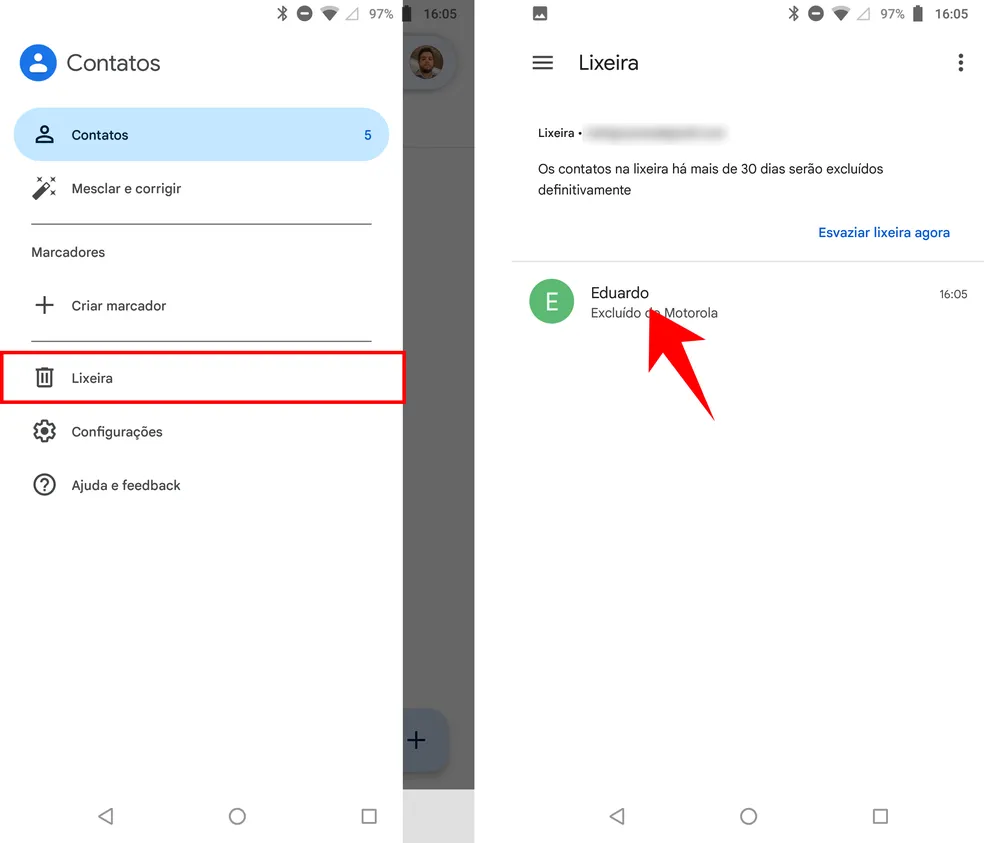
This option is particularly useful for those who notice that contacts are deleted within the retention period offered by the app.
Other Tools and Applications
In addition to native methods, several third-party tools can also help in recovering deleted contacts on Android devices:
- Dr.Fone – Android Data Recovery: works in a similar way to the iPhone version, allowing you to recover contacts, messages, photos and other important data;
- EaseUS MobiSaver for Android: an intuitive solution that enables the restoration of lost information, with a simple interface and guided process;
- Tenorshare UltData for Android: a comprehensive tool that helps recover various types of data, including deleted contacts and files.
In general, these applications may require that the device has USB debugging enabled and, in some cases, that specific drivers be installed for the computer. It is essential to follow the manufacturer's instructions to avoid risks and ensure data security.
Tips to Prevent Contact Loss
Preventing contact loss is just as important as knowing how to recover them. Taking security measures can help prevent complicated situations in the future. Here are some essential tips:
Perform Regular Backups
- Automatic synchronization: enable automatic synchronization with your Google account (on Android) or iCloud (on iPhone) to keep your data always up to date;
- Manual backups: periodically, export your contacts to a file in .vcf format or use the operating systems' native backup options;
- External storage: Consider saving your contacts to cloud storage services or external devices, ensuring a copy is always available.
Keep Sync Active
- Periodic verification: after software updates or changes to device settings, check whether contact synchronization remains active;
- Multiple services: Using more than one backup method, such as syncing with Google and manually exporting contacts, can provide an extra layer of security.
Beware of Third-Party Applications
- Conscious choice: before installing applications for data management or recovery, check the developer's reviews and reputation;
- Appropriate permissions: be wary of applications that request unnecessary permissions or access to data irrelevant to their function;
- Constant updates: prefer applications that are frequently updated and have active support to avoid vulnerabilities.
Education and Awareness
- Training: Learning about your device's features can help you avoid common mistakes, such as accidentally deleting contacts;
- Warning messages: pay attention to messages and alerts issued by operating systems when performing critical operations, such as data deletion;
- Maintenance routine: Establish a routine for reviewing and organizing contacts, ensuring that outdated information is removed without compromising important data.
By adopting these preventive measures, you not only protect user data, but also facilitate recovery in the event of an unforeseen event.
Recurring Questions
Below we present some of the recurring questions related to contact recovery and their answers:
1. What to do if there is no backup of contacts?
If there is no backup available, recovery can become more challenging. Data recovery apps can be an alternative, but the effectiveness of these methods decreases the longer the device is deleted and the more use it receives. It is essential to act as quickly as possible to increase the chances of recovery.
2. Is it possible to recover permanently deleted contacts?
Recovering contacts depends on the time elapsed and whether new data has been overwritten. If the deletion is recent and the device has not been used extensively since the event, the chances of recovery are higher. However, after a period of time, the data may be overwritten, making restoration difficult or impossible.
3. Are native methods effective to restore deleted contacts?
Yes, native methods, such as using iCloud on iPhone and Google account on Android, are usually effective in recovering contacts, as long as the backups are up to date and synchronization has been maintained. However, if the backups do not contain the desired data, it may be necessary to resort to specialized applications.
4. Are third-party apps safe to recover data?
Third-party apps, when chosen based on reviews and recommendations from trusted sources, are usually safe. Tools like Dr.Fone, EaseUS MobiSaver, and Tenorshare UltData are often used and recommended, but it is essential to download them only from official sources and keep your device protected with antivirus software and regular updates.
5. What does the expression “x” mentioned in the guidelines mean?
The expression “x” was included in the guidelines as a marker to reinforce the integration of relevant terms and keywords in the text. Although it seems generic, it serves to remind us of the importance of distributing keywords throughout the article, contributing to content optimization.
Conclusion
Recovering deleted contacts, whether on iPhone or Android, is a challenge that can be overcome with the right strategies. This article has presented effective methods to restore your address book, using both native features of the operating systems and renowned third-party applications.
The importance of maintaining regular backups and enabling sync cannot be overstated, as they are essential preventative measures to avoid data loss. By following the detailed instructions, users can choose the method that best suits their situation and recover their contacts quickly and safely.

