

Next, you will learn how to monitor your screen time, explore apps and tools that help you reduce your cell phone usage and get practical tips for adopting a more balanced lifestyle.
Nowadays, cell phones have practically become extensions of our hands. With the advancement of technology, they not only connect us to the world, but they have also become essential tools for work, entertainment and communication.
However, the screen time Excessive use can have serious impacts on our physical and mental health. If you realize that you are spending too much time on your cell phone and want to change this habit, there are several tools available to control your use of the device.
Content Index
What is screen time and why is it important to control it?
O screen time refers to the period in which you are using digital devices, such as cell phones, tablets, computers and TVs. With the constant use of social networks, messaging apps, games and streaming platforms, many people end up spending more time than desired in front of the screen.
According to studies, excessive use of electronic devices can lead to problems such as eye strain, insomnia, decreased productivity and even emotional problems such as anxiety and depression.
Read too:
- ChatGPT 4 Free: 6 ways to use it without paying
- How to Free Up Space on Google Photos: Step by Step
- The Best Photo Collage Apps on Cell Phone
Therefore, it is important to be aware of screen time and look for ways to control it. This can be done through native settings on your phone or with the help of specialized apps. Setting goals for daily screen time and learning to use your phone in a balanced way are fundamental attitudes to improving your quality of life.
Screen Time by Age: How Much is Healthy?
O screen time by age varies according to each person's age and development. Excessive exposure to screens can affect physical, mental and emotional health, so it is important to follow the guidelines of experts for each age group. Below, we detail the recommendations for different ages, promoting the balanced use of technology.
- Children under 5: Strict Screen Limit
- THE World Health Organization (WHO) recommends that children under two years of age not be exposed to screens, except for video conferencing. For children between the ages of 2 and 5, screen time should be limited to a maximum of one hour per day. The focus should be on physical activities, play and face-to-face interactions, which are essential for motor and cognitive development.
- Children 6-12 years old: Moderate Control
- For children aged 6 to 12, screen time should be limited to two hours per day. Parental supervision is essential, ensuring that the content is appropriate and that the child has time to play outdoors and interact socially. Excessive screen time can affect social development and sleep.
- Teens (13-17): Balancing Digital and Real
- Teenagers tend to spend more time in front of screens, whether for studying or leisure. However, screen time should be monitored to ensure that it does not exceed two hours per day for recreational activities. In addition, it is essential that digital use does not harm sleep, physical activities and in-person social relationships, which are essential for emotional development.
- Adults: Beware of Excessive Use
- Adults also need to balance the screen time, as excessive use of devices can cause problems such as a sedentary lifestyle and eye fatigue. It is important to take regular breaks and avoid using devices before bed. Maintaining a healthy routine, with time for exercise and social interaction, helps maintain physical and mental well-being.
The key to healthy screen use is in balance. Each age group requires specific limits to ensure that technology is an ally of well-being, without harming physical and emotional health. Monitoring the screen time consciously and promoting alternative activities, it is possible to take advantage of technology without compromising quality of life.
How to see screen time on cell phone?
Android and iPhone phones have native settings that allow you to track your screen time. Here's how you can monitor your device usage on each of them:
Android
On Android, the system offers a tool called Digital Wellbeing, which allows you to monitor the time spent using applications and even set time limits.
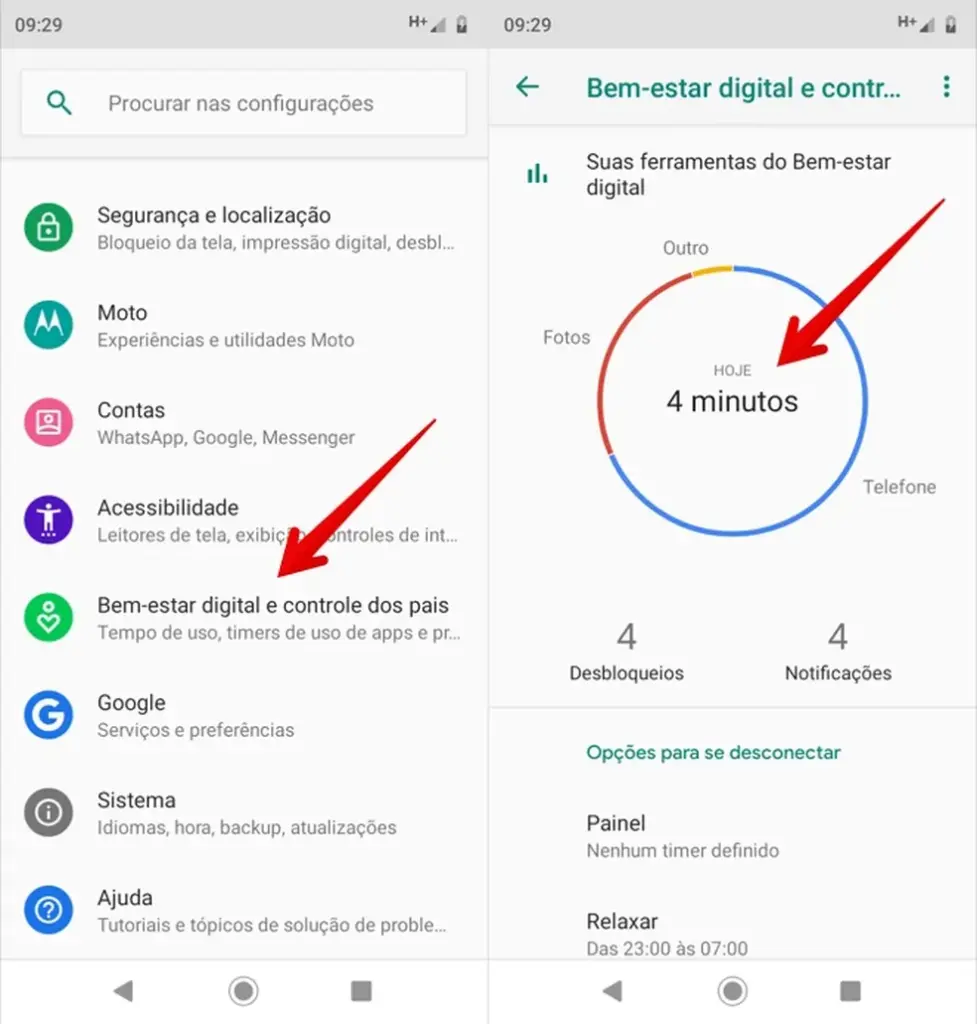
Here's how to activate:
- Open the settings from your cell phone;
- Go to Digital Wellbeing and parental controls;
- Tap on the option Control Panel, where you will see the total time of use of the device, as well as detailed information by application;
- To see your usage by week, tap the graph icon at the top of the screen and swipe to view your usage history.
iPhone
On iPhone, similar functionality is the Usage Time, which provides detailed data on screen time:

- Open Settings and go to Usage Time;
- Tap on See All Activities to view the time spent on each app;
- You can view daily or weekly usage history and set time limits for each app.
Apps to control screen time
In addition to the native features of operating systems, there are several applications developed to help you control the screen time more effectively. Check out some of the best ones:
1. Forest
O Forest is an interesting application that uses a gamification concept to help you focus and reduce your cell phone usage time.

The idea is simple: every time you decide to stay away from your phone for a period of time, you plant a virtual tree. The longer you stay away from your phone, the bigger the tree grows. If you give in to temptation and unlock your phone, the tree dies.
Besides being fun, the Forest encourages productivity and provides a visual way to track time spent on other tasks. It is an excellent app for those who want to learn how to stay focused.
2. StayFree
O StayFree is a powerful app for monitoring your phone usage time. It provides detailed graphs of your daily and weekly app usage, and also lets you set time limits for apps. When you reach the limit, StayFree blocks the app.
Additionally, the app also provides insights into the impact of excessive app usage on your productivity, with data that helps you identify which apps are consuming the most of your time.
3. Digital Wellbeing
For Android users, the Digital Wellbeing offers many tools to monitor and control the screen time. You can view your daily usage time, set goals, and even block apps when the time limit is reached.
Furthermore, the Digital Wellbeing includes the option to enable the Rest Mode, which turns off notifications and reduces distractions at night.
4. Freedom
O Freedom is an application that allows you to block access to specific applications and websites for a period of time, helping to reduce excessive cell phone use.
It can be used on both mobile devices and computers, making it an excellent tool for anyone looking to set limits on screen time.
Tips for reducing screen time
In addition to using apps to monitor and limit screen time, there are some practical tips that can help you reduce the time spent on your cell phone:
1. Set times to use your cell phone
An effective way to control the screen time is to set specific times to use your cell phone, such as during lunch or after work. Avoid using your cell phone in the morning or throughout the day, especially when you are busy with other important tasks.
2. Disable notifications
Notifications are one of the main reasons why we spend more time on screen. By turning off notifications from apps that aren’t urgent, you avoid distractions and are less tempted to reach for your phone every now and then.
3. Use your cell phone only for essential tasks
Avoid the habit of picking up your phone to distract yourself. Use it only for essential tasks, such as making calls, responding to important messages, or accessing necessary information. This helps reduce the temptation to browse social media or use entertainment apps.
4. Find alternative activities
If your phone is taking up too much of your free time, find alternative activities, such as exercising, reading a book, or spending more time with family and friends. The more you engage in other activities, the less tempted you will be to spend hours on your phone.
Consequences of Excessive Cell Phone Use
O excessive cell phone use can significantly affect physical and mental health. As screen time increases, the negative impacts become increasingly evident. Below, we highlight the main effects of this practice.
- Psychological impacts: constant exposure to social media can generate anxiety It is low self-esteem, mainly through comparison with idealized lives. In addition, the need to always be connected can cause stress and difficulty relaxing;
- Sleep problems: the blue light emitted by screens interferes with the production of melatonin, impairing sleep quality and leading to disorders such as insomnia, impacting mood during the day;
- Physical consequences: the sedentary lifestyle and postural problems are common in those who spend a lot of time on their cell phones. cell phone neck syndrome is an example, with neck and back pain due to incorrect posture;
- Digital addiction: excessive use can lead to digital addiction, impairing concentration and memory. The constant cycle of rewards from social media affects the ability to focus and logical reasoning.
Benefits of Reducing Screen Time for Health and Well-Being
Reduce the screen time offers a number of important benefits for physical, mental and emotional health. By controlling your mobile device usage, you can significantly improve your quality of life.
- Increased productivity: less time in front of screens means more focus and fewer distractions. This allows you to dedicate more time to productive tasks, improving efficiency at work and in studies;
- Improved mental health: Excessive screen time, especially on social media, is associated with increased anxiety and stress. By reducing your screen time, you reduce these negative effects and have more time for activities that benefit your mental health, such as meditation or offline hobbies;
- Physical health benefits: prolonged use of devices can lead to problems such as neck and back pain, as well as increasing the risk of diseases related to a sedentary lifestyle. By reducing screen time, you can include more physical activity in your routine, improving your posture and cardiovascular health;
- Sleep quality: Using screens before bed interferes with the production of melatonin, making it difficult to fall asleep. By reducing screen time at night, you improve the quality of your sleep and promote a more restful rest;
- Strengthening personal relationships: Less time on your phone means more time to interact in person with friends and family. This strengthens bonds and fosters greater emotional connection, which is essential for well-being.
Conclusion
Control the screen time is essential to maintain the balance between the digital world and the real world. Using tools such as Digital Wellbeing, Forest It is Moment, you can monitor and reduce the time spent using your cell phone, ensuring greater productivity and mental health.
By adopting healthy habits and using technology to your advantage, you can improve your quality of life and keep your cell phone as a useful tool, without it becoming a villain in your daily life.

