

If you're a Roblox player, you've had some very bad news in the last few days... Roblox Voice Chat Blocked! But don't worry, here you'll find out why both voice and text chat on Roblox are blocked and how to unblock them even if you don't meet the requirements!
First, don't worry! This isn't a bug or a penalty; you're not at risk of having your account banned. The chat has been blocked for everyone. Learn more below:
Content Index
Why was Roblox Voice Chat blocked?
Both Roblox chat modes (voice and text) officially began being blocked on January 7th due to Roblox's new safety rules for protecting children and preventing the risk of inappropriate contact between children and adults on the platform.
This restriction came about due to numerous complaints and reports worldwide of predators using the platform to lure minors.
See too:
Groups based on age range
To unlock the chat, you now need to complete a photo verification, where the platform will examine the user's photo and estimate their age. Based on this information, the platform will create age-based groups, allowing interaction only with members of the same group. The groups are as follows:
- Children under 9 years old: Voice and Text Chat are prohibited!
- Adolescents (9-17 years old): They can use the chats, and they can talk to the same group; the groups are divided into:
- Adults (18+): They need to perform facial recognition and submit a document to unlock access to the chats.
Below are the age-separated groups, and who they can interact with within Roblox:
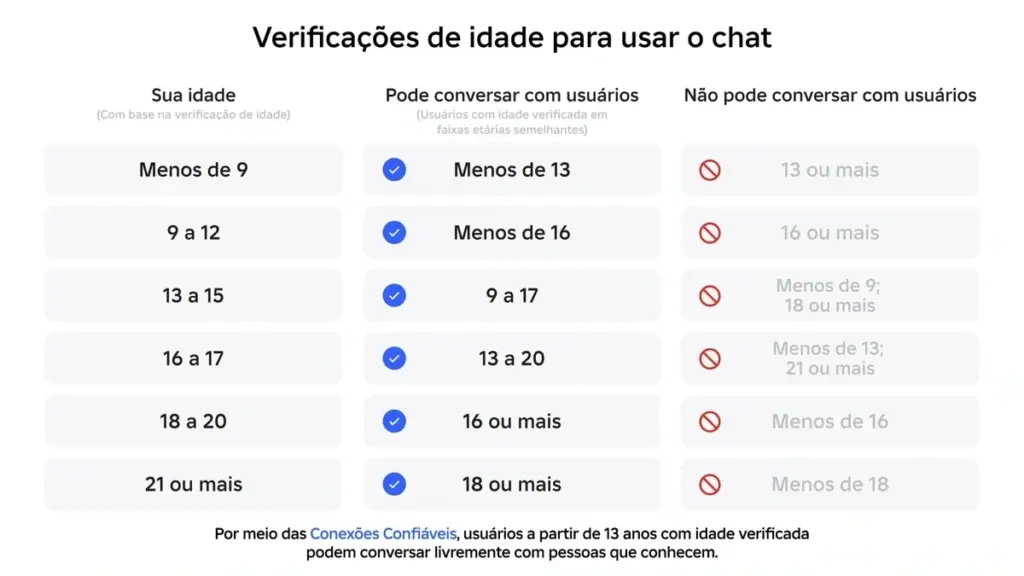
It will not be possible for minors to interact via text or voice chat with adults in the new system. And children under 13 will need parental approval to unlock the chat.
How to Unblock Roblox Voice Chat

When you access the platform you will receive a message in pop-up To unlock the chat, if you're not receiving it, just follow the steps below. I will teach you how to unlock it on the main platforms where Roblox is played:
- On Android or iOS, go to More In the bottom menu, scroll down until you find settings; On your computer, Playstation, and Xbox, click the gear icon at the top to open the settings.
- click in Privacy and content restrictions;
- Select Communication It is Experience chat;
- Click to Activate Experience Chat. This will bring up a window asking you to complete the verification process to unlock the chat;
How to perform the verification
No pop-up asking to complete the verification. click continue, This will open a new tab with information to verify via the camera. All photos and videos will be deleted as soon as you confirm the verification, so don't worry. Click on continue. Try again until you open the phone's camera. If it asks for permission to access the camera, photos, or files on your smartphone, allow it.
With the camera open, find a well-lit place, preferably with a white background, and follow the on-screen verification steps, centering your face and turning it to the sides as requested.
The Roblox system will verify the submitted images to compare them and estimate whether the age provided when creating the Roblox account matches the face.
Children under 9 years old: When the verification begins, you will be asked for the responsible party. Click the button. “"ask now"” and provide the responsible party's email address. The responsible party will receive an email requesting information to verify their identity using an ID document or credit card. Once this is done, they can click on... “"allow"” And the child will be able to continue the verification normally, following the steps described above.
Is it possible to bypass Roblox's Voice Chat Verification?
It's impossible to use the chat at the moment without verification; it will remain blocked until you verify it. Yes, there are ways to bypass it, and it's not very difficult, and over time more and more methods will be discovered and invented by the community.
Cheating isn't difficult; for example, you can ask someone else to verify the account. Just be careful about the age you entered when creating the account and the age of the person verifying it. For example, if you are 10 years old, created the account with your age, and ask your father to verify it, it won't work!
Currently, there's no known way to completely bypass the verification, and it's best not to, as it's for your own safety. But even if you bypass the age verification, there's still the limitation of only being able to communicate with people in your age range; that's something you can't get around.
Risks of Bypassing Verification
In addition to the risks you may expose yourself to on the platform by ignoring the implemented security methods, there is the clear risk of having your account banned. After all, this new layer of security is precisely to prevent malicious adults from interacting with children. And if you bypass it, you may trigger a Roblox alert leading to your account being banned.
Any method that circumvents the rules imposed by the platform may result in a complete account ban, from using scripts and third-party software to gain an advantage, to bypassing security methods!
Alternatives to Voice Chat
An alternative to voice chat for those who don't want to do the verification already exists and is widely used by the community. Using third-party tools, which is already more common than usual. Using the Discord to make calls with friends, or use WhatsApp.
DO NOT MAKE CALLS WITH STRANGERS! Interact on Roblox, as well as other platforms, only with people you know, and if you suspect anything, have a strange conversation, or even if your friends insist on making advances, show the conversations to your guardians!
Conclusion
Here you discovered how the new security layer that temporarily blocked Roblox's voice chat works. Roblox implemented this security measure amidst numerous investigations and reports worldwide of malicious individuals interacting with children through Roblox experiences.
Roblox's new text and voice chat limitation, after verification, will only allow interaction between accounts with a similar age range. Adults, in general, will only be able to interact with other adults.
Bypassing this security could lead to your account being banned, or at the very least be a wasted effort. After all, if you are a child and complete verification as an adult, you will not be able to interact with your friends using accounts belonging to minors.

