

This content will present various techniques and methods for recovering deleted contacts from iPhones and Android devices, ensuring the security and integrity of your data.
We will cover everything from native system processes to practical tips for avoiding future losses, so be sure to check out the full content.
Keep reading and discover all the detailed strategies to restore your contacts and keep your information protected.
Table of Contents
Understanding the Loss of Contacts
Contact deletion can occur for various reasons and often unexpectedly. Identifying the causes is crucial for taking the right steps in recovery and prevention. Below, we list some of the most common causes:
- Accidental deletion: It's common that, when cleaning up your address book or deleting duplicate contacts, errors occur and important contacts are unintentionally removed;
- Synchronization failures: problems during synchronization with your Google or iCloud account can lead to data loss, especially if the connection is unstable or if there are errors in server updates;
- System updates: In some cases, iOS or Android updates may cause temporary glitches, affecting your contact list;
- Restoring or resetting the device: restoring the device to factory settings without having made an up-to-date backup may result in the permanent deletion of contacts;
- Use of third-party applications: unreliable contact management or data cleaning software may interfere with and delete important contacts.
Understanding these causes not only helps in data recovery, but also in preventing new incidents, allowing the user to adopt safer and more conscious practices.
Read also:
- Best 4K mobile wallpaper apps
- DeepSeek vs. ChatGPT: Which is better? See the differences.
- NuCel: Meet Nubank's New Mobile Operator
Recovering Contacts on iPhone
iPhone devices offer several native and third-party options for recovering deleted contacts. Below are the most commonly used methods, recommended by experts, for recovering deleted contacts from an iPhone .
Recovery via iCloud
iCloud is a powerful tool for restoring data, including contacts, provided that synchronization is enabled and a recent backup is available.
- To access the iCloud website: open your browser and go to iCloud.com ;
- Log in: Enter your Apple ID and password to access your account;
- Navigate to the settings: click on the “Settings” icon (represented by a gear) and scroll until you find the “Advanced” section;
- Select “Restore Contacts” : in the “Restore Contacts” option, choose the desired backup and click “Restore” ;
- Complete the process: Please wait while iCloud restores your contacts to your device.

This method is simple and effective, especially for users who keep iCloud synchronization always enabled.
Backup via iTunes or Finder
Another effective alternative for recovering deleted contacts from an iPhone is to restore a backup previously made via iTunes or, in more recent versions of macOS, via Finder.
- Connecting the device to the computer: Use a USB cable to connect the iPhone to the computer;
- Open iTunes or Finder: depending on your macOS version, use Finder (macOS Catalina or later) or iTunes (for earlier versions and Windows);
- Select the device: click on the iPhone icon and access the “Summary” tab;
- Choose “Restore Backup” : click on “Restore Backup” and select the file containing the desired contacts;
- Finalize the restoration: After confirming the operation, wait while the device is restored to the selected backup state.
It's important to note that this method will restore all device data to the date of the backup, which may result in the loss of information created after the backup was made.
Use of Third-Party Applications
When native methods aren't enough, there are several tools and apps that help recover deleted contacts on iPhones. Among the most popular are:
- Dr.Fone – Data Recovery: a complete tool that allows the recovery not only of contacts, but also of photos, messages, and other important data. The software is installed on the computer and, after connecting the iPhone, follows a guided process to recover the information.
- EaseUS MobiSaver: This app is known for its simple interface and effectiveness in recovering lost data, including contacts, photos, and messages.
- Tenorshare UltData: another reliable option that offers a wide range of data recovery, including deleted contacts, files, and messages.
Each tool has its own particularities and, therefore, it is recommended to check the specific reviews and instructions for each application before proceeding with the recovery.
Recovering Contacts on Android
For Android users, recovering deleted contacts can be easily done using native methods and specialized apps. Below, we detail the main alternatives.
Recovery via Google Account
Google accounts are widely used to sync device data, including contacts. If syncing is enabled, recovery can be easily done.
- Access your device settings: in the “Settings” menu, locate the “Accounts” or “Google” section;
- Check synchronization: make sure contact synchronization is enabled;
- To use the “Restore contacts” option : on some devices, there is a direct option to restore contacts from your Google account. Select the desired account and tap “Restore”.
This method relies on active synchronization and regular backups made automatically by Google, ensuring that the data is always up-to-date on the company's servers.
Using the Trash Bin in the Contacts App
Google's “Contacts” app has a feature that stores deleted data in the trash for up to 30 days , allowing for easy contact recovery.
- Open the “Contacts” app : On your Android device, open the “Contacts” app;
- To access the trash can menu: tap the menu icon (usually represented by three lines or dots) and select the “Trash” option;
- Select the contacts for restoration: in the trash, identify the deleted contacts and choose the ones you want to recover;
- Confirm the restoration: click “Restore” to reintegrate the contacts into your main address book.
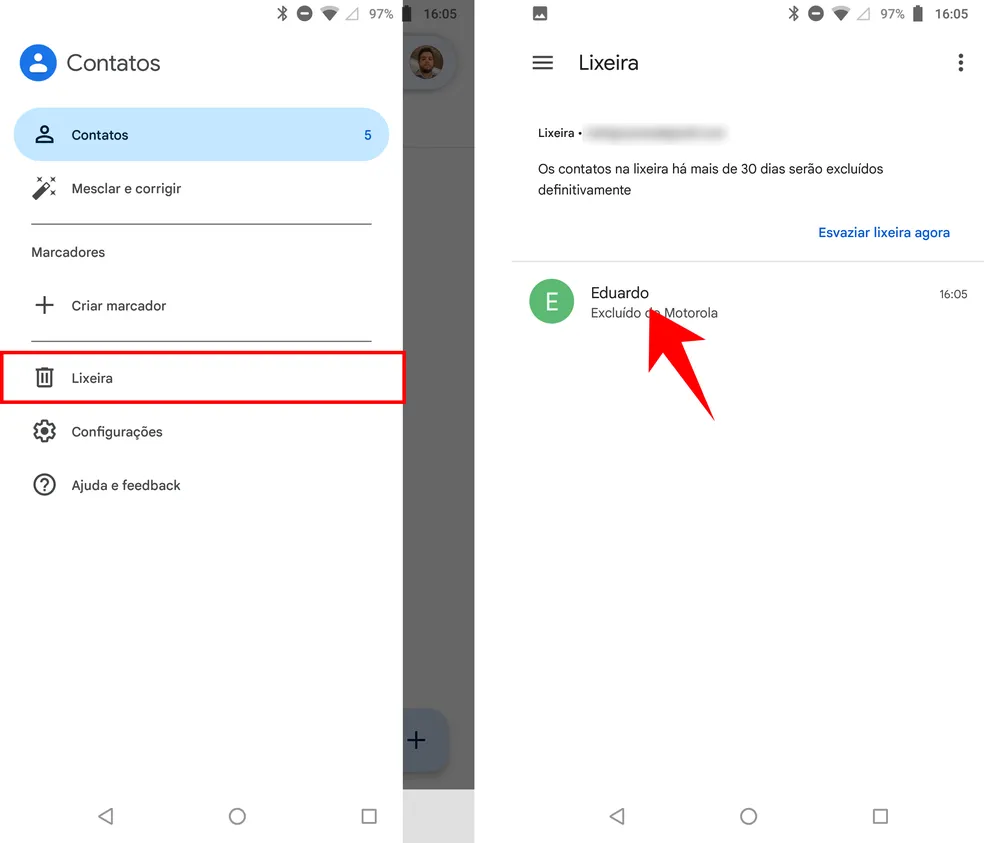
This option is particularly useful for those who notice contacts being deleted within the retention period offered by the app.
Other Tools and Applications
In addition to native methods, several third-party tools can also help recover deleted contacts on Android devices:
- Dr.Fone – Data Recovery for Android: works similarly to the iPhone version, allowing the recovery of contacts, messages, photos, and other important data;
- EaseUS MobiSaver for Android: an intuitive solution that enables the restoration of lost information, with a simple interface and guided process;
- Tenorshare UltData for Android: a comprehensive tool that helps recover various types of data, including deleted contacts and files.
In general, these applications may require the device to have USB debugging enabled and, in some cases, specific drivers to be installed on the computer. It is essential to follow the manufacturer's instructions to avoid risks and ensure data security.
Tips to Prevent Loss of Contacts
Preventing the loss of contacts is just as important as knowing how to recover them. Adopting security measures can avoid complicated situations in the future. Check out some essential tips:
Perform regular backups.
- Automatic synchronization: Enable automatic synchronization with your Google account (on Android) or iCloud account (on iPhone) to keep your data always up to date;
- Manual backups: Periodically export your contacts to a .vcf file or use the native backup options of your operating system;
- External storage: Consider saving your contacts to cloud storage services or external devices, ensuring a copy is always available.
Keep Syncing Active
- Periodic check: After software updates or changes to device settings, check if contact synchronization remains active;
- Multiple services: Using more than one backup method, such as synchronization with Google and manual export of contacts, can offer an extra layer of security.
Beware of Third-Party Applications
- Make a conscious choice: before installing data management or recovery applications, check the developer's reviews and reputation;
- Appropriate permissions: be wary of apps that request unnecessary permissions or access to data irrelevant to their function;
- Constant updates: prefer apps that are frequently updated and have active support to avoid vulnerabilities.
Education and Awareness
- Training: learning about the functionalities of the devices can help avoid common mistakes, such as accidentally deleting contacts;
- Warning messages: Pay attention to messages and alerts issued by operating systems when performing critical operations, such as deleting data;
- Maintenance routine: Establish a routine for reviewing and organizing contacts, ensuring that outdated information is removed without compromising important data.
By adopting these preventative measures, you not only protect user data, but also facilitate recovery should any unforeseen event occur.
Frequently Asked Questions
Below are some frequently asked questions related to contact recovery and their answers:
1. What to do if there is no backup of contacts?
If a backup is not available, recovery can become more challenging. Data recovery applications can be an alternative, but the effectiveness of these methods decreases as time passes after deletion and the device continues to be used. It is crucial to act as quickly as possible to increase the chances of recovery.
2. Is it possible to recover permanently deleted contacts?
Recovering contacts depends on the time elapsed and the overwriting of new data. If the deletion is recent and the device hasn't been used intensively since then, the chances of recovery are higher. However, after a period of time, the data may be overwritten, making restoration difficult or impossible.
3. Are native methods effective for restoring deleted contacts?
Yes, native methods, such as using iCloud on iPhone and a Google account on Android, are generally effective in recovering contacts, provided that backups are up-to-date and synchronization has been maintained. However, if backups do not contain the desired data, it may be necessary to resort to specialized applications.
4. Are third-party applications safe for data recovery?
Third-party applications, when chosen based on reviews and recommendations from reliable sources, are usually safe. Tools like Dr.Fone, EaseUS MobiSaver, and Tenorshare UltData are frequently used and recommended, but it's essential to download them only from official sources and keep your device protected with antivirus software and regular updates.
5. What does the word “x” mentioned in the instructions mean?
The word “x” was included in the guidelines as a marker to reinforce the integration of relevant terms and keywords in the text. Although it seems generic, it serves to remind us of the importance of distributing keywords throughout the article, contributing to content optimization.
Conclusion
Recovering deleted contacts, whether on iPhone or Android, is a challenge that can be overcome with the right strategies. This article presented effective methods for restoring contacts, using both native operating system features and reputable third-party applications.
The importance of maintaining regular backups and enabling synchronization cannot be underestimated, as these are essential preventative measures to avoid data loss. By following the detailed instructions, users can choose the method that best suits their situation and recover their contacts quickly and securely.

